Team members
Settings → Organization is your company’s record inside Sync GTM and the list of everyone who can work in it. It sits above workspaces: your plan, credit balance, and invoices all belong to the organization, so anyone you invite here works from the same pool.
🎥 Watch: inviting your team
What the screen holds
- Organization profile — your company name and domain, with Edit to change them. The name is what appears on invoices.
- Members — everyone with access, their join date, status, and role. Sort by Name, filter by Role, or search the list.
- + Invite — top-right, the only way to add someone.
Switch organization
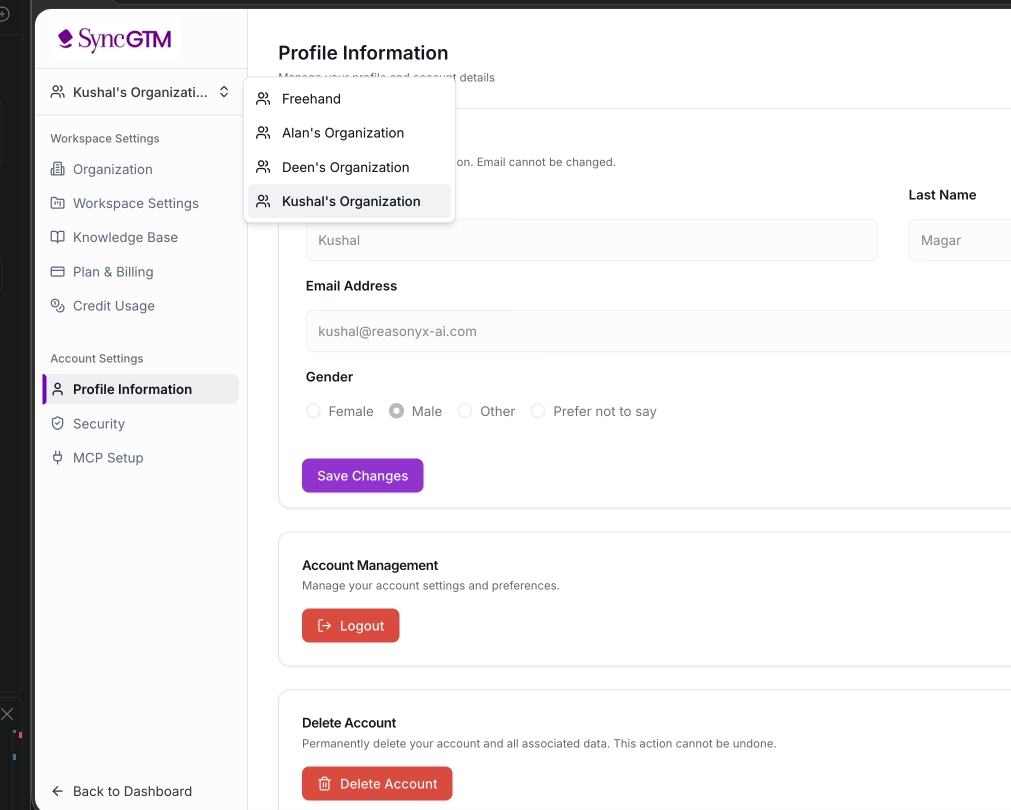
Make sure you are in the right organization. If you belong to more than one, everything on this screen — members, credits, and workspaces — belongs to whichever organization is currently selected. Invite someone while the wrong one is active and they land in the wrong place.
Click the current organization name in the top-left of the settings sidebar, then pick the organization you want from the dropdown. The screen reloads into that organization and you get access to its workspaces.
Invite a team member
- Open Settings from your avatar in the top-right
- Click Organization — the header shows your organization name and current member count
- Click + Invite in the top-right
- Enter the person’s work email address
- Send the invite
The person appears in the members table straight away with status Invited and no join date. Once they accept and finish signing up, the status flips to Active and the Joined at column fills in.
Invite agencies the same way — there is no separate guest type. An agency contact is a member of your organization with a role you control.
Roles and statuses
| Role | What it means |
|---|---|
| Owner | The account that created the organization. Owns billing and the plan. |
| Member | Works in the organization’s tables. Change it any time from the Role dropdown on that person’s row. |
| Status | What it means |
|---|---|
| Invited | Invite sent, not yet accepted. No join date. |
| Active | Signed in and working. |
To remove someone, click the delete icon in the Action column on their row. They lose access immediately; the tables and data they created stay in the organization.
Everyone shares the same credits
Credits are held at the organization level, not per seat. There is no per-person allocation and nothing to divide up:
- Every member draws from the same balance when they run an action or an enrichment
- A heavy auto-run table in one workspace spends the same credits as everything else
- Adding a member does not add credits — top up the balance from Plan & Billing
Watch the shared balance under Credit Usage before you hand a large list to a new teammate.
Organization vs Workspace
| Level | Holds |
|---|---|
| Organization | Billing, credits, people, company profile |
| Workspace | One table, its actions, and its data |
Common use cases
- Bring a teammate into the same tables and the same credit balance
- Give an agency or contractor access without a separate account type
- Change someone’s role as their responsibilities change
- Remove access the day someone leaves
- Check who has access before a handover or a security review
Best practices
- Invite people on their work email — it is what invites and notifications go to
- Review the member list quarterly; access outlives projects
- Remove a leaver the same day, and rotate any provider API keys they had
- Keep the billing owner on an address the company controls, not a personal one
- Check the shared credit balance before handing a large list to a new member — everyone draws from the same pool
Where to next
- Workspace Settings — the level below
- Plan & Billing — what the organization pays for
- Credit Usage — where the shared balance goes
- Profile Information — your own account, not the company’s